Old offers still live. Bumps you stopped selling years ago, still being bought. ThriveCart doesn't make it easy to see which bumps, upsells and downsells are even matched to which offer - let alone which ones convert. So it all just sits there, potentially costing you thousands in lost revenue.
The good news? There's a quick fix.
The Funnel Footprint pulls your entire ThriveCart product library into one clean, searchable Airtable dashboard - so you can finally see everything, fix what's broken and know exactly what's converting.
Finally a solution! I want this!No coding - just copy and paste · No Zapier · Just ThriveCart + Airtable · Sets up in about 20 minutes
Dozens of checkouts. Maybe even hundreds. No way to see which bumps, upsells and downsells are assigned to each one. And, it turns out, a few old offers that really shouldn't have been buyable anymore.
But every time you open ThriveCart to check a bump or upsell, you're clicking in and out of products, waiting for pages to load, getting frustrated and pushing it down your to do list.
But you also know...
- You've got bumps attached to products but you couldn't tell someone off the top of your head which ones or if they're something you still promote
- You have offers that you no longer sell actively - but they're still floating around out there somewhere on the web
- You know there's probably checkouts that need optimising but no way to know which are missing bumps & upsells
- You're not sure if your upsells and downsells are actually converting, because getting to that data is such a faff
- You've got 50, 100, maybe 200+ products and absolutely zero bird's eye view of any of it
And ThriveCart doesn't exactly help.
There's no dashboard that shows you which bumps or upsell go with which offer. No CSV export. No easy way to see conversion rates at a glance without clicking into every single product individually. And you're WAY too busy for that!
So it sits on the to-do list. Indefinitely.
Until something happens that forces your hand.
For me, it was an awkward email. A customer had purchased something and was asking questions about it - and I had absolutely no idea what they were referring to. It turned out they'd found an old link to a product I hadn't sold in years. The branding was outdated, the advice inside hadn't been updated for a long time...
Whoops.In the same week I had the heart sink moment where someone bought my $247 offer for $27 when they stumbled on a rogue link.
Owch.That's when I stopped putting it off and built The Funnel Footprint.

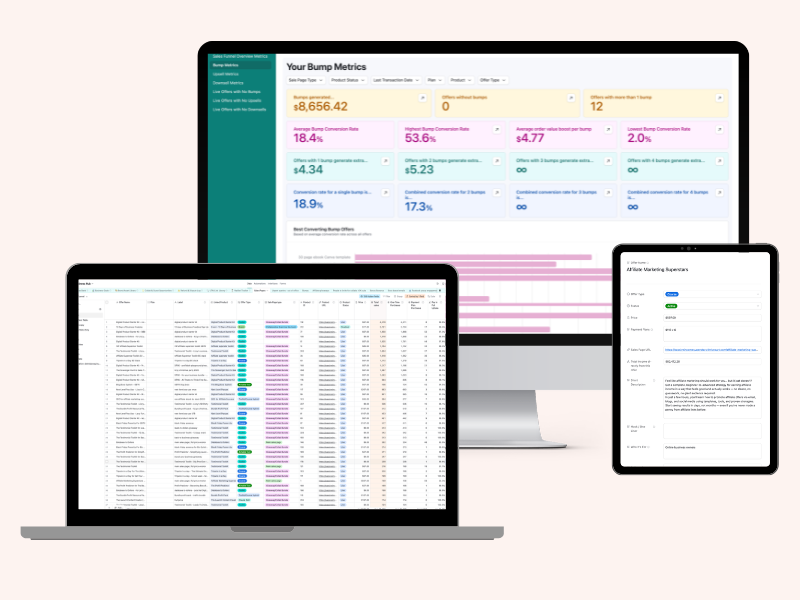
A data sync tool that automatically pulls your entire ThriveCart product library into Airtable - every product, every bump, every upsell and downsell, every payment plan - so you've got one organised, filterable dashboard that tells you exactly what's live, what's converting and what needs fixing.
Every product. Every bump. Every upsell and downsell. What's live, what's archived, what's still accessible when it really shouldn't be.
You can filter by conversion rate and instantly spot the bumps that are pulling their weight - and the ones that aren't. You can see which products are missing an upsell opportunity. You can find that one old offer you need to properly retire before someone else stumbles across it.
Spot what's converting
Filter by conversion rate or revenue per sale: instantly spot the bumps pulling their weight - and the ones that aren't.
Retire old offers properly
Find that old offer you need to properly retire before someone stumbles across it as a bump, upsell or downsell.
Find missing upsells
See which products are missing an upsell opportunity and fix them before you lose any more money.
And it's not just a spreadsheet. Seven built-in dashboards turn that data into a proper bird's eye view - bump metrics, upsell metrics, downsell metrics plus instant lists of any live offer that's missing a bump, upsell or downsell entirely.
No more clicking. No more guessing. No more cringe-y customer emails.
And no more easy money left on the table!
⚙️ The Script
Pulls all your ThriveCart data straight into Airtable automatically - products, bumps, upsells, downsells, conversion rates, payment plan data, the lot. No Zapier, no third-party tool - it runs for free on your own computer using your ThriveCart and Airtable API keys.
Before & After Tracking
Switch out a bump, add a new upsell, test a different downsell - then track exactly what changed. See the before-and-after side by side so you know what's actually working, not just what you hope is working.
The Setup Wizard
Grab your ThriveCart API key and your Airtable token, paste them into the setup wizard, and you're done. No coding knowledge needed - it's copy and paste setup. If you can follow step-by-step instructions, you're good.
The Airtable Base
A pre-built Airtable template that's ready to go the moment your data lands in it. Tracks up to 6 bumps, 5 upsells and 5 downsells per product, plus a Bump Copy Library so you can store your best-performing bump copy and reuse it on new offers instead of writing from scratch.
Step by step walkthrough guide
I'll take you through the full setup from scratch. Most people are up and running in about 20 minutes. (The first sync can take a few hours if you've got a lot of products - but it just works away in the background on your computer whilst you crack on with your day!)
Seven Built-In Dashboards
Bump Metrics, Upsell Metrics, Downsell Metrics and instant lists of any live offer missing a bump, upsell or downsell. A proper bird's eye view of your whole funnel ecosystem, not just a spreadsheet.
Weekly Set & Forget Sync
Set it up once and your Airtable base keeps itself current automatically every week, with full troubleshooting and FAQ support if you ever get stuck. No need to remember to run anything yourself.
The Offers Table
Link your sales pages to your offer with one click, and see exactly what each offer has made in total - every launch, flash sale, evergreen funnel, tripwire, upsell and downsell, all rolled into one number. No more adding it up yourself across a dozen different rows.
- Product names, URLs and status (live, test, or disabled)
- Price and payment plan options (one-time, 2-pay, 3-pay, etc.)
- Total sales, product revenue and total funnel revenue
- Average order value (AOV) and funnel uplift %
- Pay in full uptake and refund rate
- Last transaction date (so you can identify dormant offers)
- Bump name, price, conversion rate and average revenue per sale
- Total revenue generated from each bump
- Date added or last reconfigured, so you know how fresh the data is
- Side-by-side comparison so you can spot your winners - and the ones quietly dragging the average down
- Offer names, prices, conversion rate and average revenue per sale
- Payment plan details where applicable (instalments, total price)
- Date added, status (live, live-new, removed) and retired date
- Which ones are pulling their weight - and which ones aren't
- Average, highest and lowest conversion rates - across bumps, upsells and downsells
- Average revenue per sale for every bump, upsell, downsell and your whole funnel
- Your best-performing bumps, upsells and downsells, ranked
- Which offers are missing a bump, upsell or downsell entirely
I looked. I couldn't find a tool that pulled ThriveCart bumps, upsells and downsells into one place and actually made sense of them - so I built one. Here's what that means in practice:
- It's built for ThriveCart users specifically.This isn't a generic analytics tool that vaguely works with ThriveCart. It's built entirely around how ThriveCart structures your data - products, bumps, upsells, downsells - and pulls exactly what you need into a format that's actually useful.
- It tracks conversion rates per bump per product - not just overall.Knowing a bump converts at 15% overall is fine. Knowing it converts at 22% on one product and 4% on another? That's where the real insight is. The Funnel Footprint shows you both.
- It keeps running without you.Once you've set up the weekly sync, your data updates automatically. You're not doing a manual export every time you want to check something. It's there when you need it.
- You don't need Zapier or any paid third-party tool.This runs for free on your own computer using your ThriveCart and Airtable API keys - nothing else to sign up for, nothing else to pay for. If you've already got ThriveCart and a free Airtable account, that's all you need.
- It comes with seven built-in dashboards.Most tools give you a spreadsheet and leave you to figure out what it means. The Funnel Footprint turns your data into visual bump, upsell and downsell metrics - plus instant lists of any offer missing one entirely. So the data actually leads somewhere.
This is for you ✓
- You've been using ThriveCart for a while and your product library has grown into something you can no longer easily navigate
- You want to know which bumps and upsells are actually converting - without clicking into every single product to find out
- You've got old offers that you've stopped selling but you're not 100% sure they're fully locked down
- You're still growing your product library and want a clean system from the start rather than waiting until it's a disaster
- You love data but don't love spending hours manually pulling it together
This is not for you if...
- You're not on ThriveCart - this is built specifically for ThriveCart and won't work with other platforms
- You have just a handful of products and a very simple funnel setup - though it'll still work, you might not get as much from it yet

I'm Leanne
A systems-obsessed online business strategist who probably gets too much joy from a well-organised Airtable base.
I run my business on part-time hours so I can be a present mum to my two little ones, and I've built most of my income on exactly the kind of set-and-forget systems that mean I'm not glued to my laptop all day.
I've been using ThriveCart since 2021 and have grown my product library to 248 products. Which sounds impressive until you realise that also means 248 opportunities for bumps, upsells and downsells to get completely out of hand.
I built The Funnel Footprint because I couldn't find anything that solved this problem - and because the alternative (clicking in and out of ThriveCart one product at a time, waiting for pages to load) was the kind of task I'd been cheerfully ignoring for two years.
But when I finally mapped out my offers, I realised I'd been sitting on thousands of dollars of revenue that I could have uncovered with a few tiny tweaks.
Can I help you uncover lost revenue next?
Once I had everything in front of me, the picture wasn't pretty.
I'd sold an upsell I'd retired years ago - last bought only a few months back, the toolkit it belonged to long gone from my offers. I found three live versions of a retired offer, still sitting out there for anyone to stumble on. Two versions of a $597 offer were still floating around priced at $297. And one of my actively-sold offers still had a bump attached that I don't sell anymore - someone bought it.
Beyond the "oh no" moments, the data told me things I'd never have guessed:
- My most-used upsell was also my lowest-converting one
- 37% of my primary sales pages had no upsell at all
- My best bump outperformed my worst by 22x - on offers with comparable traffic
- Adding a payment plan option to a downsell almost doubled uptake
- My best funnel boosted AOV by 141%. My average funnel? 27%. All begging to be optimised.
That gap between my best and my average is where the real money was hiding.

Nadia Arbach
“The Funnel Footprint helped me get a much more useful view of my funnel stats. The only way I previously got the information was via Thrivecart's individual stats, and I couldn't see it all pulled together. It's much easier to see with the dashboard, and I'm looking forward to seeing my information automatically updated weekly. But the best part of the Funnel Footprint was that when I ran into issues, Leanne was able to guide me and help me figure out what was going wrong. Thanks to her great communication, I now have a working sync and I'm really excited to put the information to use!”
One swapped upsell or one tweaked bump can pay for this many times over. Everything after that is just profit you'd have otherwise left sitting there.
The Funnel Footprint

Regular price: $297
$147
Launch price - price goes up to $297 on Friday 17th July
- The Script - pulls all your ThriveCart data into Airtable automatically
- The Setup Wizard - copy and paste setup, no coding needed
- Pre-built Airtable Base (up to 6 bumps, 5 upsells, 5 downsells per product)
- Step-by-step setup walkthrough guide
- Seven built-in dashboards - bump, upsell & downsell metrics
- Before & after tracking when you change your funnels
- Weekly Automation Guide (no Zapier needed)
- Troubleshooting & FAQ
- Mac + Windows compatible
Honestly? A little bit, but probably less than you're worried about. The setup process is mostly copy and paste - there's no coding involved - but you do need to be careful to copy the right things into the right places. The sync itself is straightforward and most people get through it fine.
The one bit that's slightly more involved is the automation lesson - scheduling the sync to run automatically. This involves your computer's terminal or command prompt, which can feel unfamiliar if you've never seen it before. But there's an interactive tool included that creates your personalised command for you, so it's still just copy and paste - just a few more steps than the rest of the setup.
The good news: the automation is completely optional. You only need a single copy-paste command to run the sync manually whenever you want. If you'd rather skip the scheduling, you lose nothing except having to click "run" yourself once a week. That's it.
You'll need a free Airtable account, but you don't need any prior experience with it. The base is pre-built and ready to go - you're just connecting your data to it.
Yes - there are setup instructions for both.
No. This runs for free on your own computer using your ThriveCart API key and your Airtable token. If you've already got ThriveCart and a free Airtable account, that's everything you need - no extra subscriptions, no third-party automation tools.
You can set it up to sync weekly (or more frequently if you want). The automation guide walks you through how to schedule it. Once it's running, it just... runs.
The Funnel Footprint will still work - and it's a great way to build your product library in an organised way from the start. That said, it's most powerful for people who've been using ThriveCart for a while and have accumulated a lot of offers.
Right now it's specifically a ThriveCart to Airtable sync. It's designed to sit alongside my other data tools (coming soon) - including Email Intelligence Data Engine and the Money Metrics Data Engine - if you want to build out a fuller picture of your business performance over time.
Seven of them in total - Bump Metrics, Upsell Metrics, Downsell Metrics, plus instant lists of any live offer that's missing a bump, upsell or downsell entirely. Conversion rates, revenue generated, your best and worst performers, all laid out visually so you don't have to dig for it.
Yes - if you switch out a bump, add a new upsell, or test a different downsell, you can track the before and after. So instead of guessing whether a change helped, you'll actually know.
There's a lot of support built in for exactly this. Every step has a written guide with screenshots, and there are separate instructions for Mac and Windows throughout. For the automation setup specifically, there's an interactive tool that creates your personalised command so you don't have to work it out yourself.
If something goes wrong, there's a troubleshooting guide covering the most common issues - and a troubleshooting tool where you paste in what you're trying to do and the message you're seeing in your terminal or command prompt, and it gives you a diagnosis and step-by-step instructions to fix it. Plus there are walkthrough videos if you want to see the whole thing done in real time before you start. And if you're still stuck, you can always email me.
One thing worth knowing: upsells and downsells only appear in the data once they've had at least one real transaction. If you've just set one up and it's never been purchased, it won't show yet - this is a ThriveCart API limitation rather than a bug.
The workaround is simple: do a test purchase using a 100% off coupon. This triggers the API and pulls the upsell or downsell into the data straight away, including the correct price. One test purchase per new upsell or downsell is all it takes.
Here's the short version. You download 2 files and save them to a folder. You download a tool called Node. You find your ThriveCart API key, Airtable access token and Airtable IDs (step by step instructions where to find them). You then open a tool called Terminal (if you're on a Mac) or Command Prompt (if you're on Windows), copy and paste a couple of prompts. The setup wizard asks you for the credentials you found earlier. You then copy and paste another command to run the sync. You're done. Wait an hour or two and your Airtable will be populated with all your funnels and their stats! After that you can explore the 7 dashboards straight away - no further setup needed. Most people complete the active setup in about 20 minutes.
Of course - just email leanne@passiveincomesuperstars.com and I'll get back to you within 2 business days.
Get The Funnel Footprint for just $147 (price goes up to $297 on Friday 17th July)
Yes - give me The Funnel FootprintGot more questions? Drop us an email at leanne@passiveincomesuperstars.com


Add The Decision Dashboard and save 50%
One-time offer - just $23.50 (usually $47)
The Decision Dashboard sorts your ideas, tasks, tech and plans by what's actually worth your time, your energy and your money.
It includes 9 tools built with Airtable that will help you get unstuck, stop procrastinating, take decisive action and start building real momentum in your business!
Tick the box above to grab this decision tool for half price!


 Passive Income Superstars